Minetestmapper#
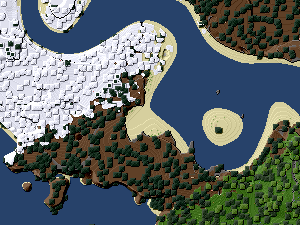
Sample minetestmapper output
The minetestmapper utility creates a top-down overview image of your world, where one node corresponds to one pixel.
Usage#
Make sure there is a colors.txt file that matches the game of your world the same folder as the mapper, or the world folder.
The default file is suitable only for Minetest Game without mods.
On GNU/Linux, open a terminal in the folder the mapper is. Create a map using this command:
./minetestmapper -i "/home/user/.minetest/worlds/my_world/" -o "/home/user/map.png"On Windows, Shift + Right click in the folder the mapper is in, then select Open a command window here. To create a map, type this command:
minetestmapper.exe -i "C:\your_path_to_luanti\worlds\example" -o map.pngThe geometry option allows you to define an area to map. Use it between “./minetestmapper” and the input “-i”.
minetestmapper.exe --geometry -10000:-10000+20000+20000 -i "C:\your_path_to_luanti\worlds\example" -o map.pngResult: A 20.2 MiB file covering a 20,000 × 20,000 area starting in the lower left corner at X=-10,000; Y=-10,000
Installation#
You can find the code for the C++ minetestmapper on GitHub. Windows releases are also available.